Thursday, November 11, 2010

How to Improve Your Tech Habits

Banish Seven Bad Tech Habits

You brush daily, rotate your tires regularly, file your taxes on time, and exercise at least twice a week. In other words, you have lots of good habits. But when it comes to technology, well, we need to talk. You know all the icons cluttering your desktop, and the passwords you keep in Notepad, and the half-baked backup you make once a month? Those are the results of bad habits--and they're not the only ones.

Fortunately, it's easier than you might think to correct bad tech behavior, to handle your computer with the same care and wisdom that you use in safeguarding for your gums.

Bad Habit #1: Creating Too Much Desktop Clutter

Your Windows desktop looks like the inside of your junk drawer, with icons stretched from one end of the screen to the other. How can you find anything in that mess?

If you need a good way to organize everything, try Stardock's Fences. This free utility corrals icons into semitransparent desktop pens, thereby reducing clutter and improving organization. Best of all, the first time you run it, Fences offers to sort and "fence" your icons automatically. It's like having a maid swoop in and clean your desktop!

For the ultimate in desktop decluttering, double-click in any open area, and watch as Fences hides all of your icons--or leaves only a select few visible. Another double-click brings everything back. Now you can enjoy your pretty Windows wallpaper without having to sweep your icons into the Recycle Bin.

Bad Habit #2: Using the Power Button to Shut Down

When you're done using your laptop, your impulse is to press the power button to shut it down, right? Not so fast: On many systems, the power button's default function is to put the machine into Sleep mode. That's not necessarily a bad thing: A "sleeping" PC resumes operation in a matter of seconds, which is quite handy; but it still constitutes a bad habit, for two reasons.

First, because Sleep mode is not the same as Off, your laptop will continue to consume battery power. So unless it's connected to an AC outlet, you may return to a drained, dead PC--one that took any unsaved work with it when it gave up the ghost. Second, if you rely exclusively on Sleep mode, your PC rarely gets a chance to reboot--and rebooting is essential to keeping Windows running smoothly.

To banish this habit, simply change the function of your power button so that it actually shuts down the system. Here's how Vista users can make the change:

1. Click Start, type power, and then click Power Options.

2. In the lefthand sidebar, click Choose what the power buttons do.

3. You should see a pull-down menu alongside When I press the power button. Choose the setting you want.

4. Click Save changes and you're done.

(The only time you should press and hold the power button to turn off your PC is when the system is locked up and you have no other way of resetting it.)

Bad Habit #3: Storing Passwords in a Text File

Oh, the irony: You come up with a hackproof password to use on your banking site, and then you store a copy of that password in an unprotected spreadsheet, Outlook note, or smartphone memo. Goodbye, protection.

You need a password manager--a heavily fortified database for important data such as passwords, PINs, and Social Security numbers. We're partial to LastPass, which generates secure passwords, applies them when you visit various Web sites, organizes any and all private data you care to store, and also syncs across multiple platforms and devices so you have access to your passwords anytime, anywhere. Amazingly, LastPass is free, though you'll have to upgrade to the Pro version if you want the companion Android, BlackBerry, iPhone, Palm, and/or Windows Mobile apps.

Bad Habit #4: Using the Mouse to Launch Programs

Old habits--like reaching for the mouse every time you want to run a program--die hard. Here's a little-known but much faster alternative: In Windows 7 (and Vista, if you enable the Quick Launch toolbar), you can launch any program to the right of the Start button by using the Windows key and a number.

For example, the icon in the taskbar that's closest to the Start button (usually Internet Explorer) is linked to '1'. By pressing Windows-1, you can launch that program directly from your keyboard. Pressing Windows-2 is like clicking the second icon, and so on. This method works for the first nine icons pinned to the Windows 7 taskbar (or to the Vista Quick Launch toolbar). Still running XP? TryLaunchy, a terrific keyboard-powered launcher that lets you open programs, files, and even Web favorites with a few keystrokes.

Bad Habit #5: Carrying an Unencrypted Flash Drive

Flash drives are great for transporting data, but they're easy to lose, which could mean big trouble for your private data.You can correct this vulnerability (and overcome the bad habit of leaving yourself in jeopardy) by installingTrueCrypt, an open-source encryption utility that password-protects the data on your flash drive.

TrueCrypt works on-the-fly, meaning that it encrypts and decrypts data as you access it. (The software also works with individual files and entire hard drives, in case your bad habit extends to your laptop.) If you don't supply the correct password or encryption key, your data remains locked tight, thanks to a variety of very secure encryption algorithms. TrueCrypt is pretty easy to use and is totally transparent once it's up and running; get started with our handy beginner's tutorial.

Bad Habit #6: Blindly Clicking 'Next' When Installing Software

Ever wonder by what means mysterious new icons appear on your desktop? Why unknown toolbars appear in your Web browser? How spyware manages to sneak onto your PC? One possibility: You gave them permission.

If you've installed more than a handful of programs in your computing life, you've probably gotten in the habit of automatically clicking every 'Next' button an installer throws your way. Big mistake. During the setup process, some programs ask if you also want to install, say, trial versions of the company's other programs, or maybe a new search tool for your browser. If you blindly click your way through the setup screens, approving things left and right, you'll miss your chance to opt out of these offers--and you'll end up with stuff you probably don't want.

So slow down, speedy. Take a few extra seconds to read the fine print, and avoid unwelcome surprises.

Bad Habit #7: Relying on a Single Backup Method

We're not going to harangue you yet again about the importance of making backups. But making smart backups bears some haranguing. Most users who take the trouble to back up rely on a single method, and usually a sloppy one at that--namely, dragging the contents of their My Documents folder to a blank DVD, or running a backup program without knowing how to use it to restore files in the event of disaster.

You need is a diversified backup system that covers all of your bases, not just one or two. First, use an external hard drive to clone your primary drive, and pair it with software (like Casper 6.0) that will perform the operation regularly. Next, sign up for an online backup service (like Carbonite or Mozy) that automatically archives important data (documents, photos, financial records, and the like) in the background while you work.

Now it's time to get more granular. Install Xmarks to synchronize your browser's favorites (and passwords, if you like) to the Web and/or to another PC. Use Google's free Google Calendar Syncutility to make an online backup of your Outlook calendar; or spend some money on gSyncit 2.0 to sync Outlook's contacts, calendars, and tasks to your Google account. Speaking of Google, for around Rs 250 per year, it offers you 20GB of online Picasa Web storage, enough to hold (and preserve) any modest family-photo collection. Bottom line: The more automated methods you use to back up your PC, the better off you'll be.

Wednesday, November 10, 2010

What Your Computer Does While You Wait

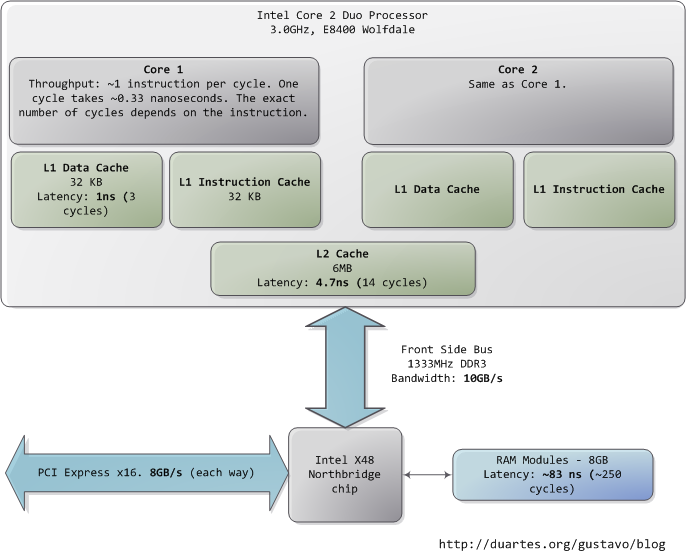
This post takes a look at the speed - latency and throughput - of various subsystems in a modern commodity PC, an Intel Core 2 Duo at 3.0GHz. I hope to give a feel for the relative speed of each component and a cheatsheet for back-of-the-envelope performance calculations. I’ve tried to show real-world throughputs (the sources are posted as a comment) rather than theoretical maximums. Time units are nanoseconds (ns, 10-9 seconds), milliseconds (ms, 10-3 seconds), and seconds (s). Throughput units are in megabytes and gigabytes per second. Let’s start with CPU and memory, the north of the northbridge:

Latency and throughput in an Intel Core 2 Duo computer, North Side

The first thing that jumps out is how absurdly fast our processors are. Most simple instructions on the Core 2 take one clock cycle to execute, hence a third of a nanosecond at 3.0Ghz. For reference, light only travels ~4 inches (10 cm) in the time taken by a clock cycle. It’s worth keeping this in mind when you’re thinking of optimization - instructions are comically cheap to execute nowadays.

As the CPU works away, it must read from and write to system memory, which it accesses via the L1 and L2 caches. The caches use static RAM, a much faster (and expensive) type of memory than theDRAM memory used as the main system memory. The caches are part of the processor itself and for the pricier memory we get very low latency. One way in which instruction-level optimization is still very relevant is code size. Due to caching, there can be massive performance differences between code that fits wholly into the L1/L2 caches and code that needs to be marshalled into and out of the caches as it executes.

Normally when the CPU needs to touch the contents of a memory region they must either be in the L1/L2 caches already or be brought in from the main system memory. Here we see our first major hit, a massive ~250 cycles of latency that often leads to a stall, when the CPU has no work to do while it waits. To put this into perspective, reading from L1 cache is like grabbing a piece of paper from your desk (3 seconds), L2 cache is picking up a book from a nearby shelf (14 seconds), and main system memory is taking a 4-minute walk down the hall to buy a Twix bar.

The exact latency of main memory is variable and depends on the application and many other factors. For example, it depends on the CAS latency and specifications of the actual RAM stick that is in the computer. It also depends on how successful the processor is at prefetching - guessing which parts of memory will be needed based on the code that is executing and having them brought into the caches ahead of time.

Looking at L1/L2 cache performance versus main memory performance, it is clear how much there is to gain from larger L2 caches and from applications designed to use it well. For a discussion of all things memory, see Ulrich Drepper’s What Every Programmer Should Know About Memory (pdf), a fine paper on the subject.

People refer to the bottleneck between CPU and memory as the von Neumann bottleneck. Now, the front side bus bandwidth, ~10GB/s, actually looks decent. At that rate, you could read all of 8GB of system memory in less than one second or read 100 bytes in 10ns. Sadly this throughput is a theoretical maximum (unlike most others in the diagram) and cannot be achieved due to delays in the main RAM circuitry. Many discrete wait periods are required when accessing memory. The electrical protocol for access calls for delays after a memory row is selected, after a column is selected, before data can be read reliably, and so on. The use of capacitors calls for periodic refreshes of the data stored in memory lest some bits get corrupted, which adds further overhead. Certain consecutive memory accesses may happen more quickly but there are still delays, and more so for random access. Latency is always present.

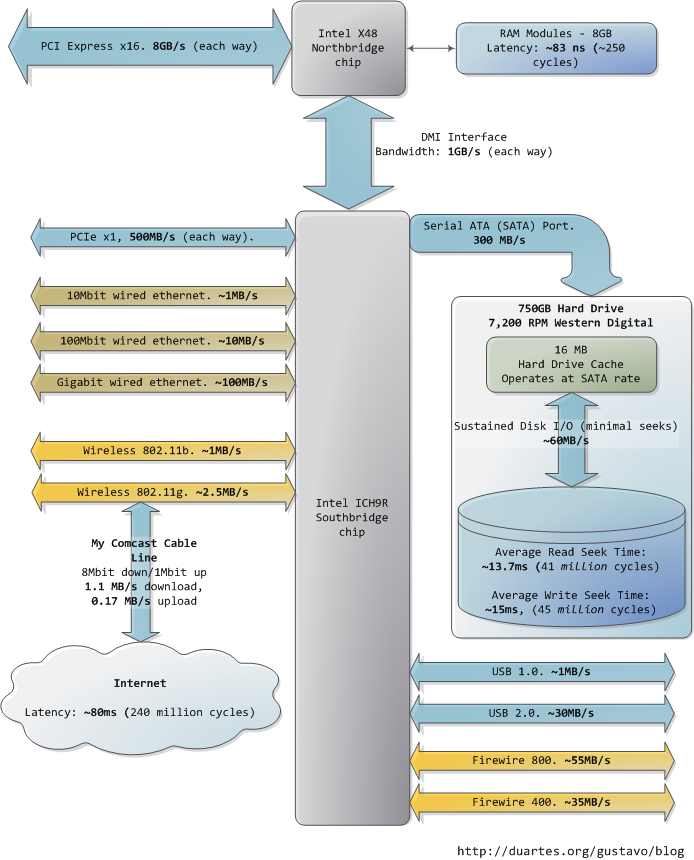
Down in the southbridge we have a number of other buses (e.g., PCIe, USB) and peripherals connected:

Latency and throughput in an Intel Core 2 Duo computer, South Side

Sadly the southbridge hosts some truly sluggish performers, for even main memory is blazing fast compared to hard drives. Keeping with the office analogy, waiting for a hard drive seek is like leaving the building to roam the earth for one year and three months. This is why so many workloads are dominated by disk I/O and why database performance can drive off a cliff once the in-memory buffers are exhausted. It is also why plentiful RAM (for buffering) and fast hard drives are so important for overall system performance.

While the “sustained” disk throughput is real in the sense that it is actually achieved by the disk in real-world situations, it does not tell the whole story. The bane of disk performance are seeks, which involve moving the read/write heads across the platter to the right track and then waiting for the platter to spin around to the right position so that the desired sector can be read. Disk RPMs refer to the speed of rotation of the platters: the faster the RPMs, the less time you wait on average for the rotation to give you the desired sector, hence higher RPMs mean faster disks. A cool place to read about the impact of seeks is the paper where a couple of Stanford grad students describe theAnatomy of a Large-Scale Hypertextual Web Search Engine (pdf).

When the disk is reading one large continuous file it achieves greater sustained read speeds due to the lack of seeks. Filesystem defragmentation aims to keep files in continuous chunks on the disk to minimize seeks and boost throughput. When it comes to how fast a computer feels, sustained throughput is less important than seek times and the number of random I/O operations (reads/writes) that a disk can do per time unit. Solid state disks can make for a great option here.

Hard drive caches also help performance. Their tiny size - a 16MB cache in a 750GB drive covers only 0.002% of the disk - suggest they’re useless, but in reality their contribution is allowing a disk toqueue up writes and then perform them in one bunch, thereby allowing the disk to plan the order of the writes in a way that - surprise - minimizes seeks. Reads can also be grouped in this way for performance, and both the OS and the drive firmware engage in these optimizations.

Finally, the diagram has various real-world throughputs for networking and other buses. Firewire is shown for reference but is not available natively in the Intel X48 chipset. It’s fun to think of the Internet as a computer bus. The latency to a fast website (say, google.com) is about 45ms, comparable to hard drive seek latency. In fact, while hard drives are 5 orders of magnitude removed from main memory, they’re in the same magnitude as the Internet. Residential bandwidth still lags behind that of sustained hard drive reads, but the ‘network is the computer’ in a pretty literal sense now. What happens when the Internet is faster than a hard drive?

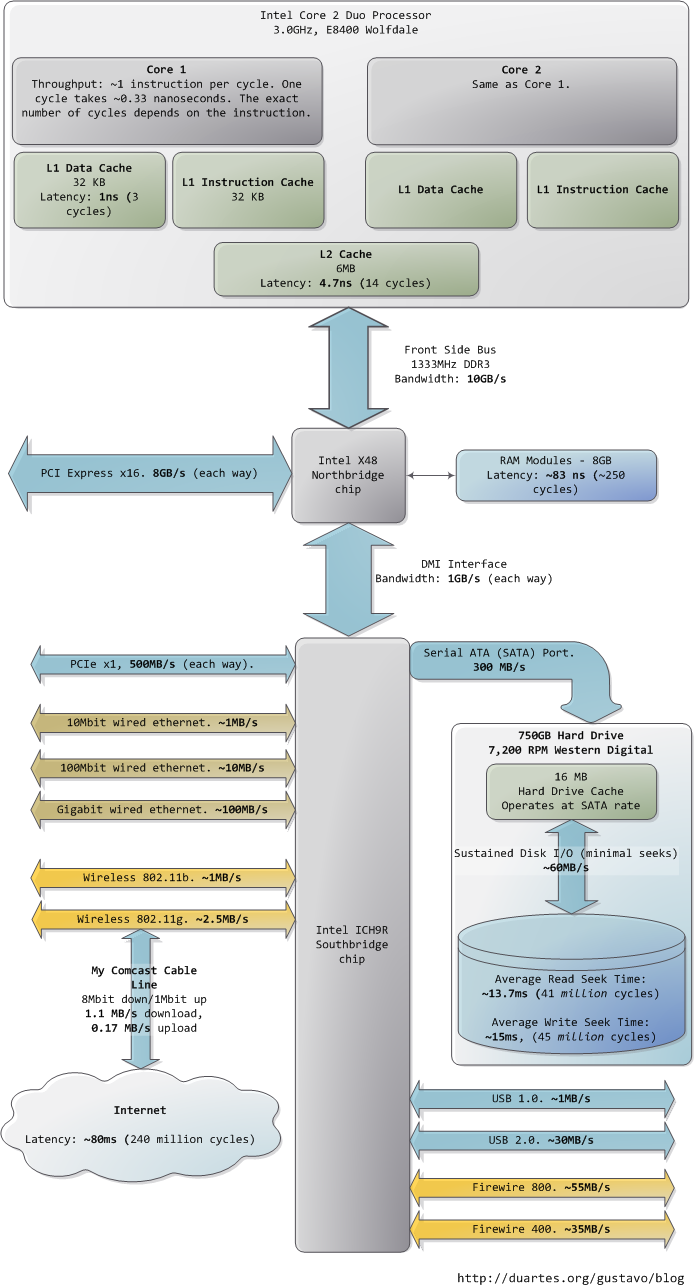
I hope this diagram is useful. It’s fascinating for me to look at all these numbers together and see how far we’ve come. Sources are posted as a comment. I posted a full diagram showing both north and south bridges here if you’re interested.

Monday, November 1, 2010

Five Best File Encryption Tools


Five Best File Encryption ToolsFile encryption is your best bet if you want to keep The Man, foreign spies, or your annoying roommates out of your files. Here's a look at five of the most popular encryption tools Lifehacker readers use to lock down their files.

Image a composite of photos by Anonymous Account and flaivoloka.

Earlier this week we asked you to share your favorite encryption tool. We tallied up your votes, and now we're back to highlight the five most popular tools for the encryption job.

GNU Privacy Guard (Windows/Mac/Linux, Free)

Five Best File Encryption Tools
GNU Privacy Guard (GnuPG) is an open-source implementation of the the famed Pretty Good Privacy (PGP) encryption tool—you can read the very interesting history of PGP andhow GnuPG came to be here. GnuPG is a volume and individual file encryption tool with support for a dozen encryption schemes, paired keys, and expiring signatures. GnuPG doesn't only provide rock-solid local file encryption; it is, thanks to paired encryption and public key servers, a great tool for encrypted communication. Please note, regular old GnuPG is a command line tool. Check out the list of graphical wrappers and application plugins for various operating systems here. The screenshot above is from Cryptophane, a graphical Windows interface for GnuPG.

Disk Utility (Mac, Free)

Five Best File Encryption Tools
Disk Utility is a diverse tool that handles almost any disk-related tasks you'd need on OS X. The utility is capable of creating secure disk images and file volumes encrypted with AES 128-bit or 256-bit encryption. Like most native Mac utilities and applications, Disk Utility and the accompanying encryption blends seamlessly into the OS X experience and makes mounting and unmounting encrypted volumes a breeze. If you've never created an encrypted disk using Disk Utility before, take a look at our previous guide.

TrueCrypt (Windows/Mac/Linux, Free)

Five Best File Encryption Tools
TrueCrypt is a free, powerful, and on-the-fly disk encryption tool. With TrueCrypt, you can create secure encrypted virtual disks or even encrypt entire drives. TrueCrypt is an on-the-fly encryption tool, meaning files are decrypted as you access them and modify them and then encrypted when not in use. Thanks to various optimization tricks and full utilization of the power of modern processors, working within a TrueCrypt volume feels no different than working on a regular unsecured disk. TrueCrypt not only offers strong and transparent encryption—it also offers the ability to create hidden volumes within encrypted volumes for even more secure (and obscured) file protection.

7-zip (Windows, Free)

Five Best File Encryption Tools
Compared to some of the heavyweights in this Hive Five (like GnuPG and TrueCrypt), it might be easy to dismiss the popular file compression tool 7-zip as a lightweight. 7-zip fills a perfect niche for many people, however, by offering simple ZIP container-based encryption. If you're not interested in encrypting a ton of files or maintaining an entire encrypted volume, but you still want to make sure important documents like tax returns or other Social Security bearing documents are locked up tight, 7-zip sports strong AES-256 encryption. Create a new compressed archive, throw your files in it, and slap a password on. Your files are strongly encrypted and stored right alongside your regular documents.

AxCrypt (Windows, Free)

Five Best File Encryption Tools
AxCrypt is a free encryption tool for Windows. Once installed it integrates with the Windows shell and offers simple right-click encryption and decryption of files with AES-256 encryption. Your entire interaction with AxCrypt can take place exclusively from the right-click context menu. In addition to integrating with Windows and offering easy encryption and decryption, you can also use the tool to create self-extracting archives to securely transport files or transfer them to a friend—no AxCrypt installation necessary at the other end.

Password Sync Lands in Chrome Dev Channel

Password Sync Lands in Chrome Dev ChannelGoogle's Chrome browser has previously offered Google account syncing for preferences, themes, even extensions. Now, with the latest update, anyone using the Dev version of Chrome can sync their passwords across systems. If you're considering the move, though, also consider adding more security with an encryption passphrase. [Google Chrome Releases via Download Squad]


A Hacker's Story: Let me tell you just how easily I can steal your personal data

A little bird told me people are pissed at Google. According to some sources the streetview cars roaming the country have been recording private data from people's routers. By private they mean usernames, passwords, websites visited and more.

Because of this story I decided to show all of you just how easy it is for me to get all that same information. Tonight, I grabbed my laptop and went on a mission.

Wearing pyjama pants and an ironic t-shirt, I headed towards a large apartment building near where I live. I choose it because a lot of students live there and I could easily blend in. That and I knew there would be lots of targets.

I used to be a door to door salesman, so I know a few unique ways to get into a building, but I didn't need them. As I walked up to the door, someone else was leaving. They held the door open for me and I was in. As soon as I entered, I noticed a video camera. What I planned to do would look weird on camera and I didn't want security on my butt, so I was more careful from there onwards.

I went to the elevators and clicked the button. After a few minutes of waiting, I got on. Two other people joined me and I stood uncomfortably. I had to wait for them to click their floors so I didn't get off on the same floor as them.

When I finally made it to my floor a camera greeted me. I ducked my head low and walked over to the staircase. If security was watching me, I didn't want them knowing where I was.

After dropping down a few floors and switching to the other staircase I decided to do my dirty work on the 18th floor. The building was huge and it would take hours for them to search the entire thing. I opened up my laptop and lo and behold, there were eight insecure networks. I picked one at random and hit the mother-load.

If you look at the screenshot you can see 5 IP address. That means 5 people were connected to the network. It could be a bunch of roommates but because of what I found later I decided it was probably a few people stealing the same internet.

The program you see those IP's in is called Ettercap. It's no longer in development and I don't want to go over everything it does, lets just say it makes it so I can steal usernames and passwords among other things. All I had to do was install the program and run it.

I then opened a program called WireShark (you can see it in the second screenshot). Using this program I can easily see the websites these four people were browsing. As you can see this person is browsing IMDb. And in the next screenshot the person is... err...

I'd been watching these people browse the web for a while when I decided to go a little deeper. I did a search for MSN. It's interesting what I found.

That's mostly msn telling Microsoft's server that it's still alive but a little later on I was able to read the guys entire msn conversation. I also got his e-mail and the address of the guy he was talking too. It made for an interesting read.

I'm was just doing a little creepy stalking in the name of journalism but it would be incredibly easy for someone to use this info as blackmail or to hack into people's accounts. The information was being publicly broadcasted and was easy enough to get access too. The person who set up the router didn't bother to use a password and other people decided to steal it.

Not only this, a lot of the seemingly 'secure' networks in the building were protected with WEP encoding. Which, with a few simple tools found online, is hackable within seconds. In fact, our friends at Lifehacker.com just posted a tutorial on how to do it.

I did it one way but there are thousands of other ways to get this information. Any public network (such as at Starbucks or at your university) has this information floating around for anyone to read it. Remember that next time your chatting on MSN while at school, someone nearby could be reading the conversation.

Your best defense against people like me is to password protect your router using WPA encoding. If you don't know how to do this contact your internet service provider. They will give you step by step instructions.

Also, don't browse hardcore porn on a public network

Why We Hack: The Benefits of Disobedience


Why We Hack: The Benefits of DisobedienceSometimes disobedience is necessary and good when rules fail us, and it's at the core of why we hack. Hacking is a means of expressing dissatisfaction, confounding the mechanism, and ultimately doing better. Here's why it's so important.

Much of today's entertainment focuses on vigilantes, serial killers, and traditionally bad people. The common thread? They all promote disobedience as a virtue. How do you relate to a serial killer like Dexter? You do it because he murders other serial killers—read: bad people. He does something wrong because good behavior won't accomplish what needs to be done. (See also: Batman.) It's this same mentality, this same brand of unrest, that fuels all kinds of disobedience. In particular, it's why we hack.

What I Mean When I Say "Hack"
Hacking can be defined a few ways, from the more innocent type of life hacking we generally talk about to the darker side of the spectrum where people are actually carrying out highly illegal actions. Here, we fall somewhere in the gray middle, where hacking disobeys companies, circumvents copyright laws, and challenges people to do more with what they're given. Hacking is a brand of disobedience that both expresses dissatisfaction with the status quo and does something to change it. This is the kind of hacking—and disobedience—that's beneficial and good.

The Reasons for Disobedience

Why We Hack: The Benefits of Disobedience

It's hard for a lot of people to justify disobedience because it often involves breaking rules, if not the law. There's always at least a shred of incorrectness to disobedience, even if it's committed for all the right reasons. Hacking gets a bad reputation for those reasons as well, and to really understand why hacking is so important it's necessary to look at its roots: civil disobedience

Though certainly not the first instance, the idea of civil disobedience was popularized byHenry David Thoreau in his aptly titled 1848 essay Civil Disobedience. Wikipedia summarizes the thesis nicely:

It argues that people should not permit governments to overrule or atrophy their consciences, and that people have a duty to avoid allowing such acquiescence to enable the government to make them the agents of injustice.

Why It Matters

Why We Hack: The Benefits of DisobedienceWe've seen numerous examples of the benefits of civil disobedience over time, from Gandhi's campaign for independence from the British Empire (e.g.: the Salt March), to the Civil Rights Movement in 1950s and 60s America (e.g.:Rosa Parks), to the more recent Gay Rights Movement. With issues that have been around for some time it's easy to see, historically, how each group is denied rights and, at strategic times, chose disobedience as a means of fighting back. It all seems obvious now, but oppression and disobedience aren't necessarily all that different. For example, the Nazi party came to power because of civil unrest. Disobedience was a key component in Hitler's rise to power. For a more contemporary example I won't make comparisons to current political movements, because nothing is quite on the level of the third reich, but instead offer up something that's a little controversial:

Why We Hack: The Benefits of DisobedienceTake Antoine Dodson's (ofBed Intruder fame) new iPhone app that takes sex offender tracking a lot further by identifying sex offenders through the wonders of augmented reality. The general assumption is that sex offenders are bad people and knowing their locations allows us to stay safe and keep our loved ones safe. The problem, however, is that sex offender databases suck. They suck because the definition of a sex offender is so broad that it includes people like Wendy Whittaker (full text at The Economist) who engaged in sexual activity with another minor who was below the age of consent. While there are definitely bad people who belong on such a list, there are plenty—like Wendy—who do not. We're catching too many dolphins with our tuna nets, so to speak, and its these sorts of unjust and ineffective laws that define oppression. It's our often emotional reactions that let people in desire of power (in this case, politicians) step in, willing to be so tough on sex offenders that they'll throw a net to catch anyone vaguely criminal, and slowly turn us into willingly oppressive people without even knowing it. While it feels like disobedience, it's not. This is one of many reasons why disobedience is necessary.

Why We Hack

Why We Hack: The Benefits of Disobedience
So what does this all have to do with hacking? Let's look at two examples: Napster and Apple. Napster was really the beginning of the music sharing movement, which largely revolved around stealing copyrighted music by trading it online with others. The Recording Industry Association of America (RIAA) quickly stepped in and made major efforts to catch and sue as many music thieves as possible. In some cases they caught people they were after, but many people were sued by the RIAA despite their infraction either being minor orpossibly non-existent.

It is, again, the same situation: a group of people react emotionally, act without thinking, and hurt innocent people in the process. Despite the oppressive nature of the RIAA, file-sharing services were an incredible example of positive disobedience. They demonstrated the desire for purchasing and sharing unprotected digital music online, created the market for portable media players, and have reoriented the music industry more towards the benefit of the consumer. While the RIAA's witch hunt brought a number of casualties in the process, the immense change brought by the existence of music file sharing services—a simple act of disobedience—changed an entire industry.

Why We Hack: The Benefits of DisobedienceThat inevitably leads us to Apple, iTunes, and iOS. Apple quickly recognized the desire for people to buy and trade music legally, so they released the iPod and iTunes. A music store quickly grew as part of iTunes so people could legally purchase digital audio content. Initially, this content was locked down by digital rights management (DRM) copy protection, but dissatisfaction with its limitations eventually moved the music industry away from using it all-together. Today, you can buy music on iTunes and virtually any online music store with no DRM, leaving you the choice to share it with as many people as you want or simply keep it to yourself. What you do with your music is now your choice.

Why We Hack: The Benefits of DisobedienceApple recognized the problem with complex user experiences and attempted to create simpler, easier-to-use products. Their idea with iTunes had less to do with the legal consumption of music and more with the convenience, and they've applied this paradigm to all their products. With more and more people using computers and the internet, Apple's strategy has been to build the hardware and software that was the easiest to use. As a result, over the years, Apple has created two things: some pretty impressive hardware and software, but also a locked down platform that purportedly protects us from viruses, pornography, and other things Apple believes we don't want.

While no one can argue that Apple's been successful doing this, many of us who love their products but want the ability to do more are fed up. Lively communities for building Hackintosh Macs and doing amazing things with jailbroken iOS devices demonstrate the desire for the option of openness. When we purchase a product, said product should not make an effort to prevent us from using it in the way we want. Somewhere along the line, people started believing that when Apple says you shouldn't jailbreak your iPhone, it was actually against the law to do so. That's simply not the case.

We hack because we want to do better. We hack because we want to demonstrate the desire for greater possibilities. We hack because we're sick and tired of being caught in a net designed for other people. We hack because it's fun. With the internet becoming the world community, hacking is our form of civil disobedience. It's our way to passionately tear down and rebuild, confound the mechanism, and express dissatisfaction through improvement. It's about doing better, not breaking the law.

Why We Hack: The Benefits of Disobedience
In addition to hacking, the Do It Yourself (DIY) movement is a kinder form of disobedience. We've grown into a society where processes are so streamlined and tailored to the customer's convenience that we don't need to make anything anymore. Instead we can work longer hours at our jobs and come home to a house cleaned by a robot vacuum and sit down to eat the seventh take out meal of the week. It's not that these conveniences are inherently bad, but when something breaks (as a Roomba often does), you have to be prepared to vacuum yourself. At those times, you're reminded how it's important to know how to clean, how to fix things around the house, and how to cook so you can do it when you need to or want to. There are so many things we've neglected to learn or have forgotten because convenience has stripped them of their relevancy. The DIY movement stands behind the belief that forgetting how to do things is, culturally, a bad thing.

The need for disobedience comes in many forms but it all stems from being denied something we sorely need in our lives. While it's not always the right answer, it's hugely important. We need to keep on hacking so long as we're angry, frustrated, and dissatisfied with the status quo. We can sit around and complain, or we can do better. For me, it's a pretty easy choice.


Google’s Keep note-taking app is getting a new feature courtesy of Android 14 that’s a huge time-saver, even if Samsung got there first

  There’s a certain balance that needs to be achieved with lock screen functionality. You can’t give away too much because of, well, securit...