Friday, October 16, 2020

Microsoft October 2020 Patch Tuesday fixes 87 security bugs


Today is Microsoft's October 2020 Patch Tuesday, and your Windows administrators will be pulling their hair out as they install new updates and try to fix bugs that pop up.

With the October 2020 Patch Tuesday security updates release, Microsoft has released fixes for 87 vulnerabilities in Microsoft products and an advisory about today's Adobe Flash Player update.

Of the 87 vulnerabilities fixed today, 12 are classified as Critical, and 74 are classified as Important, and one as moderate.

For information about the non-security Windows updates, you can read about today's Windows 10 KB4579311 & KB4577671 Cumulative Updates.

Publicly disclosed vulnerabilities:

This month's Patch Tuesday security updates include a whopping six publicly disclosed vulnerabilities. The good news is that Microsoft states that none of them have been seen publicly exploited.

One of the vulnerabilities, CVE-2020-16938, was found by security researcher Jonas L, who recently began disclosing vulnerabilities on Twitter after being frustrated by Microsoft's bounty program.

  • CVE-2020-16938 - Windows Kernel Information Disclosure Vulnerability
  • CVE-2020-16885 - Windows Storage VSP Driver Elevation of Privilege Vulnerability
  • CVE-2020-16901 - Windows Kernel Information Disclosure Vulnerability
  • CVE-2020-16908 - Windows Setup Elevation of Privilege Vulnerability
  • CVE-2020-16909 - Windows Error Reporting Elevation of Privilege Vulnerability
  • CVE-2020-16937 - .NET Framework Information Disclosure Vulnerability

Microsoft has not disclosed who found the other five vulnerabilities.

Vulnerabilities of interest

While there were no zero-days this month, there were quite a few interesting vulnerabilities that can be exploited remotely.

Below are the more interesting Critical security vulnerabilities fixed today:

  • "CVE-2020-16911 - GDI+ Remote Code Execution Vulnerability" lets attackers create specialty crafted websites that can execute commands with elevated privileges on the visitor's computer.
  • "CVE-2020-16947 - Microsoft Outlook Remote Code Execution Vulnerability" allows attackers to send specially crafted emails that can execute commands when opened in the Microsoft Outlook software.  This attack also works when an email is viewed in the preview pane.
  • "CVE-2020-16898 - Windows TCP/IP Remote Code Execution Vulnerability" can be exploited by sending specially crafted ICMPv6 Router Advertisement packets to a remote Windows computer. If successful, it could allow a remote attacker to execute commands on the targeted computer.
  • "CVE-2020-16891 - Windows Hyper-V Remote Code Execution Vulnerability" would allow an attacker, or malware, on a guest Hyper-V virtual machine to execute commands on the host operating system.
  • "CVE-2020-16915 - Media Foundation Memory Corruption Vulnerability" can be exploited for remote code execution by tricking a user into visiting a malicious website.

Recent security updates from other companies

Other vendors who released security updates in October include:

The October 2020 Patch Tuesday Security Updates

Below is the full list of resolved vulnerabilities and released advisories in the October 2020 Patch Tuesday updates. To access the full description of each vulnerability and the systems that it affects, you can view the full report here.

TagCVE IDCVE TitleSeverity
.NET FrameworkCVE-2020-16937.NET Framework Information Disclosure VulnerabilityImportant
Adobe Flash PlayerADV200012October 2020 Adobe Flash Security UpdateCritical
AzureCVE-2020-16995Network Watcher Agent Virtual Machine Extension for Linux Elevation of Privilege VulnerabilityImportant
AzureCVE-2020-16904Azure Functions Elevation of Privilege VulnerabilityImportant
Group PolicyCVE-2020-16939Group Policy Elevation of Privilege VulnerabilityImportant
Microsoft DynamicsCVE-2020-16978Microsoft Dynamics 365 (On-Premise) Cross Site Scripting VulnerabilityImportant
Microsoft DynamicsCVE-2020-16956Microsoft Dynamics 365 (On-Premise) Cross Site Scripting VulnerabilityImportant
Microsoft DynamicsCVE-2020-16943Dynamics 365 Commerce Elevation of Privilege VulnerabilityImportant
Microsoft Exchange ServerCVE-2020-16969Microsoft Exchange Information Disclosure VulnerabilityImportant
Microsoft Graphics ComponentCVE-2020-16911GDI+ Remote Code Execution VulnerabilityCritical
Microsoft Graphics ComponentCVE-2020-16914Windows GDI+ Information Disclosure VulnerabilityImportant
Microsoft Graphics ComponentCVE-2020-16923Microsoft Graphics Components Remote Code Execution VulnerabilityCritical
Microsoft Graphics ComponentCVE-2020-1167Microsoft Graphics Components Remote Code Execution VulnerabilityImportant
Microsoft NTFSCVE-2020-16938Windows Kernel Information Disclosure VulnerabilityImportant
Microsoft OfficeCVE-2020-16933Microsoft Word Security Feature Bypass VulnerabilityImportant
Microsoft OfficeCVE-2020-16929Microsoft Excel Remote Code Execution VulnerabilityImportant
Microsoft OfficeCVE-2020-16934Microsoft Office Click-to-Run Elevation of Privilege VulnerabilityImportant
Microsoft OfficeCVE-2020-16932Microsoft Excel Remote Code Execution VulnerabilityImportant
Microsoft OfficeCVE-2020-16930Microsoft Excel Remote Code Execution VulnerabilityImportant
Microsoft OfficeCVE-2020-16955Microsoft Office Click-to-Run Elevation of Privilege VulnerabilityImportant
Microsoft OfficeCVE-2020-16928Microsoft Office Click-to-Run Elevation of Privilege VulnerabilityImportant
Microsoft OfficeCVE-2020-16957Microsoft Office Access Connectivity Engine Remote Code Execution VulnerabilityImportant
Microsoft OfficeCVE-2020-16918Base3D Remote Code Execution VulnerabilityImportant
Microsoft OfficeCVE-2020-16949Microsoft Outlook Denial of Service VulnerabilityModerate
Microsoft OfficeCVE-2020-16947Microsoft Outlook Remote Code Execution VulnerabilityCritical
Microsoft OfficeCVE-2020-16931Microsoft Excel Remote Code Execution VulnerabilityImportant
Microsoft OfficeCVE-2020-16954Microsoft Office Remote Code Execution VulnerabilityImportant
Microsoft OfficeCVE-2020-17003Base3D Remote Code Execution VulnerabilityCritical
Microsoft Office SharePointCVE-2020-16948Microsoft SharePoint Information Disclosure VulnerabilityImportant
Microsoft Office SharePointCVE-2020-16953Microsoft SharePoint Information Disclosure VulnerabilityImportant
Microsoft Office SharePointCVE-2020-16942Microsoft SharePoint Information Disclosure VulnerabilityImportant
Microsoft Office SharePointCVE-2020-16951Microsoft SharePoint Remote Code Execution VulnerabilityCritical
Microsoft Office SharePointCVE-2020-16944Microsoft SharePoint Reflective XSS VulnerabilityImportant
Microsoft Office SharePointCVE-2020-16945Microsoft Office SharePoint XSS VulnerabilityImportant
Microsoft Office SharePointCVE-2020-16946Microsoft Office SharePoint XSS VulnerabilityImportant
Microsoft Office SharePointCVE-2020-16941Microsoft SharePoint Information Disclosure VulnerabilityImportant
Microsoft Office SharePointCVE-2020-16950Microsoft SharePoint Information Disclosure VulnerabilityImportant
Microsoft Office SharePointCVE-2020-16952Microsoft SharePoint Remote Code Execution VulnerabilityCritical
Microsoft WindowsCVE-2020-16900Windows Event System Elevation of Privilege VulnerabilityImportant
Microsoft WindowsCVE-2020-16901Windows Kernel Information Disclosure VulnerabilityImportant
Microsoft WindowsCVE-2020-16899Windows TCP/IP Denial of Service VulnerabilityImportant
Microsoft WindowsCVE-2020-16908Windows Setup Elevation of Privilege VulnerabilityImportant
Microsoft WindowsCVE-2020-16909Windows Error Reporting Elevation of Privilege VulnerabilityImportant
Microsoft WindowsCVE-2020-16912Windows Backup Service Elevation of Privilege VulnerabilityImportant
Microsoft WindowsCVE-2020-16940Windows - User Profile Service Elevation of Privilege VulnerabilityImportant
Microsoft WindowsCVE-2020-16907Win32k Elevation of Privilege VulnerabilityImportant
Microsoft WindowsCVE-2020-16936Windows Backup Service Elevation of Privilege VulnerabilityImportant
Microsoft WindowsCVE-2020-16898Windows TCP/IP Remote Code Execution VulnerabilityCritical
Microsoft WindowsCVE-2020-16897NetBT Information Disclosure VulnerabilityImportant
Microsoft WindowsCVE-2020-16895Windows Error Reporting Manager Elevation of Privilege VulnerabilityImportant
Microsoft WindowsCVE-2020-16919Windows Enterprise App Management Service Information Disclosure VulnerabilityImportant
Microsoft WindowsCVE-2020-16921Windows Text Services Framework Information Disclosure VulnerabilityImportant
Microsoft WindowsCVE-2020-16920Windows Application Compatibility Client Library Elevation of Privilege VulnerabilityImportant
Microsoft WindowsCVE-2020-16972Windows Backup Service Elevation of Privilege VulnerabilityImportant
Microsoft WindowsCVE-2020-16877Windows Elevation of Privilege VulnerabilityImportant
Microsoft WindowsCVE-2020-16876Windows Application Compatibility Client Library Elevation of Privilege VulnerabilityImportant
Microsoft WindowsCVE-2020-16975Windows Backup Service Elevation of Privilege VulnerabilityImportant
Microsoft WindowsCVE-2020-16973Windows Backup Service Elevation of Privilege VulnerabilityImportant
Microsoft WindowsCVE-2020-16974Windows Backup Service Elevation of Privilege VulnerabilityImportant
Microsoft WindowsCVE-2020-16922Windows Spoofing VulnerabilityImportant
Microsoft WindowsCVE-2020-0764Windows Storage Services Elevation of Privilege VulnerabilityImportant
Microsoft WindowsCVE-2020-16980Windows iSCSI Target Service Elevation of Privilege VulnerabilityImportant
Microsoft WindowsCVE-2020-1080Windows Hyper-V Elevation of Privilege VulnerabilityImportant
Microsoft WindowsCVE-2020-16887Windows Network Connections Service Elevation of Privilege VulnerabilityImportant
Microsoft WindowsCVE-2020-16885Windows Storage VSP Driver Elevation of Privilege VulnerabilityImportant
Microsoft WindowsCVE-2020-16924Jet Database Engine Remote Code Execution VulnerabilityImportant
Microsoft WindowsCVE-2020-16976Windows Backup Service Elevation of Privilege VulnerabilityImportant
Microsoft WindowsCVE-2020-16935Windows COM Server Elevation of Privilege VulnerabilityImportant
Microsoft Windows Codecs LibraryCVE-2020-16967Windows Camera Codec Pack Remote Code Execution VulnerabilityCritical
Microsoft Windows Codecs LibraryCVE-2020-16968Windows Camera Codec Pack Remote Code Execution VulnerabilityCritical
PowerShellGetCVE-2020-16886PowerShellGet Module WDAC Security Feature Bypass VulnerabilityImportant
Visual StudioCVE-2020-16977Visual Studio Code Python Extension Remote Code Execution VulnerabilityImportant
Windows COMCVE-2020-16916Windows COM Server Elevation of Privilege VulnerabilityImportant
Windows Error ReportingCVE-2020-16905Windows Error Reporting Elevation of Privilege VulnerabilityImportant
Windows Hyper-VCVE-2020-16894Windows NAT Remote Code Execution VulnerabilityImportant
Windows Hyper-VCVE-2020-1243Windows Hyper-V Denial of Service VulnerabilityImportant
Windows Hyper-VCVE-2020-16891Windows Hyper-V Remote Code Execution VulnerabilityCritical
Windows InstallerCVE-2020-16902Windows Installer Elevation of Privilege VulnerabilityImportant
Windows KernelCVE-2020-16889Windows KernelStream Information Disclosure VulnerabilityImportant
Windows KernelCVE-2020-16892Windows Image Elevation of Privilege VulnerabilityImportant
Windows KernelCVE-2020-16913Win32k Elevation of Privilege VulnerabilityImportant
Windows KernelCVE-2020-1047Windows Hyper-V Elevation of Privilege VulnerabilityImportant
Windows KernelCVE-2020-16910Windows Security Feature Bypass VulnerabilityImportant
Windows Media PlayerCVE-2020-16915Media Foundation Memory Corruption VulnerabilityCritical
Windows RDPCVE-2020-16863Windows Remote Desktop Service Denial of Service VulnerabilityImportant
Windows RDPCVE-2020-16927Windows Remote Desktop Protocol (RDP) Denial of Service VulnerabilityImportant
Windows RDPCVE-2020-16896Windows Remote Desktop Protocol (RDP) Information Disclosure VulnerabilityImportant
Windows Secure Kernel ModeCVE-2020-16890Windows Kernel Elevation of Privilege VulnerabilityImportant

Windows 10 now blocks some third-party drivers from installing


Microsoft says that Windows 10 and Windows Server users will be blocked from installing incorrectly formatted third-party drivers after deploying this month's cumulative updates.

"When installing a third-party driver, you might receive the error, 'Windows can’t verify the publisher of this driver software'," Microsoft says.

"You might also see the error, 'No signature was present in the subject' when attempting to view the signature properties using Windows Explorer."

Triggered by broken driver catalog files

This issue is caused by improperly formatted driver catalog files that trigger the errors during the driver validation process as Microsoft explains.

Starting with the October 2020 updates, Windows requires DER-encoded PKCS#7 content to be valid and correctly embedded in catalog files. 

"Catalogs files must be signed per section 11.6 of describing DER-encoding for SET OF members in X.690," Microsoft adds.

Users who encounter these errors while attempting to install a third-party driver are advised to ask their driver vendor or device manufacturer (OEM) for an updated and correctly signed driver.

Affected Windows platforms include client (from Windows 8.1 up to Windows 004) and server versions (from Windows Server 2012 R2 up to Windows Server, version 2004).

Recently addressed known issues

Earlier this month, Microsoft said that customers who install the optional KB4577062 update for Windows 10 versions 1903 and 1909 may encounter issues upgrading on devices where HTTP Internet access for LOCAL SYSTEM accounts is blocked using a firewall.

Until a fix is available, the company encourages customers to work around this issue by re-enabling HTTP access to the Internet to the Windows 10 Setup Dynamic Update.

Microsoft also fixed Internet connectivity and Windows Subsystem for Linux 2 (WSL2) issues with the release of the KB4577063 non-security preview cumulative update for Windows 10 2004.

The company also pulled the Cumulative Update package 7 (CU7) for SQL Server 2019 on September 24, after confirming a known reliability issue affecting customers who used the database snapshot feature.

One week later, Microsoft released SQL Server 2019 CU8 with a fix for the CU7 reliability issue.


Monday, October 12, 2020

Instantly create new docs, events, spreadsheets and more from your browser


You can quickly create new files directly from your browser with “.new” domains for several Google products. For example, you can type “Cal.new” into your browser to create a new Google Calendar event.


Create breakout rooms for more engaged distance learning in Google Meet


What’s changing

Organizers of Enterprise for Education meetings can now use breakout rooms to divide participants into smaller groups during video calls in Meet. Participants can then easily rejoin the original meeting following their smaller group discussion.

This feature will be launching to additional Google Workspace editions later this year.

Use breakout rooms in Meet

Who’s impacted

End users

Why you’d use it

With this highly-requested feature, educators can offer increased engagement in their classes by splitting students up for simultaneous small group discussions or working time. Moderators can also jump between breakout rooms to monitor and participate in discussions.

Additional details

You can create up to 100 breakout rooms in a call. Call participants will then be randomly and equally distributed across the rooms. You can also manually move people into different rooms. Check out the Help Center for more details.

While only event creators can create breakout rooms, anyone with a Google account that is joining from the web or through the Meet app can be a participant.

Breakout rooms must be created during a video call on a computer.

Getting started

  • Admins: There is no admin control for this feature.
  • End users: This feature will be available by default. Visit the Help Center to learn more about using breakout rooms in Meet.

Wednesday, October 7, 2020

G Suite is now Google Workspace

Google Workspace Icons


Google  is rebranding G Suite, its set of online productivity and collaboration tools for businesses that include the likes of Gmail, Drive, Docs and Meet. The new name is Google Workspace, a name the company already hinted at when it first introduced a set of new collaboration tools and Google Meet integrations for the service earlier this year. Now those new tools are coming out of preview and with that, the company decided to also give the service a new name and introduce new logos for all the included productivity apps, which are now being used — and paid for — by more than 6 million businesses.

Image Credits: Google

G Suite, as the brand for Google’s paid offering, originally launched in 2016. In a press briefing ahead of today’s announcement, Google’s Javier Soltero, the company’s VP and GM for what is now Google Workspace, noted that the company wanted to ensure that the service that people use is the same thing that people buy.

Image Credits: Google

“By selecting Google Workspace, we get the brand association with Google, which is really important to us,” he said. “These products are flagship products for Google itself — and the ability to actually describe the product in the same way, whether it’s to a buyer or to a user.” Google, he added, wants its customers to see Workspace as a product that brings together all the tools they need to get their work done.

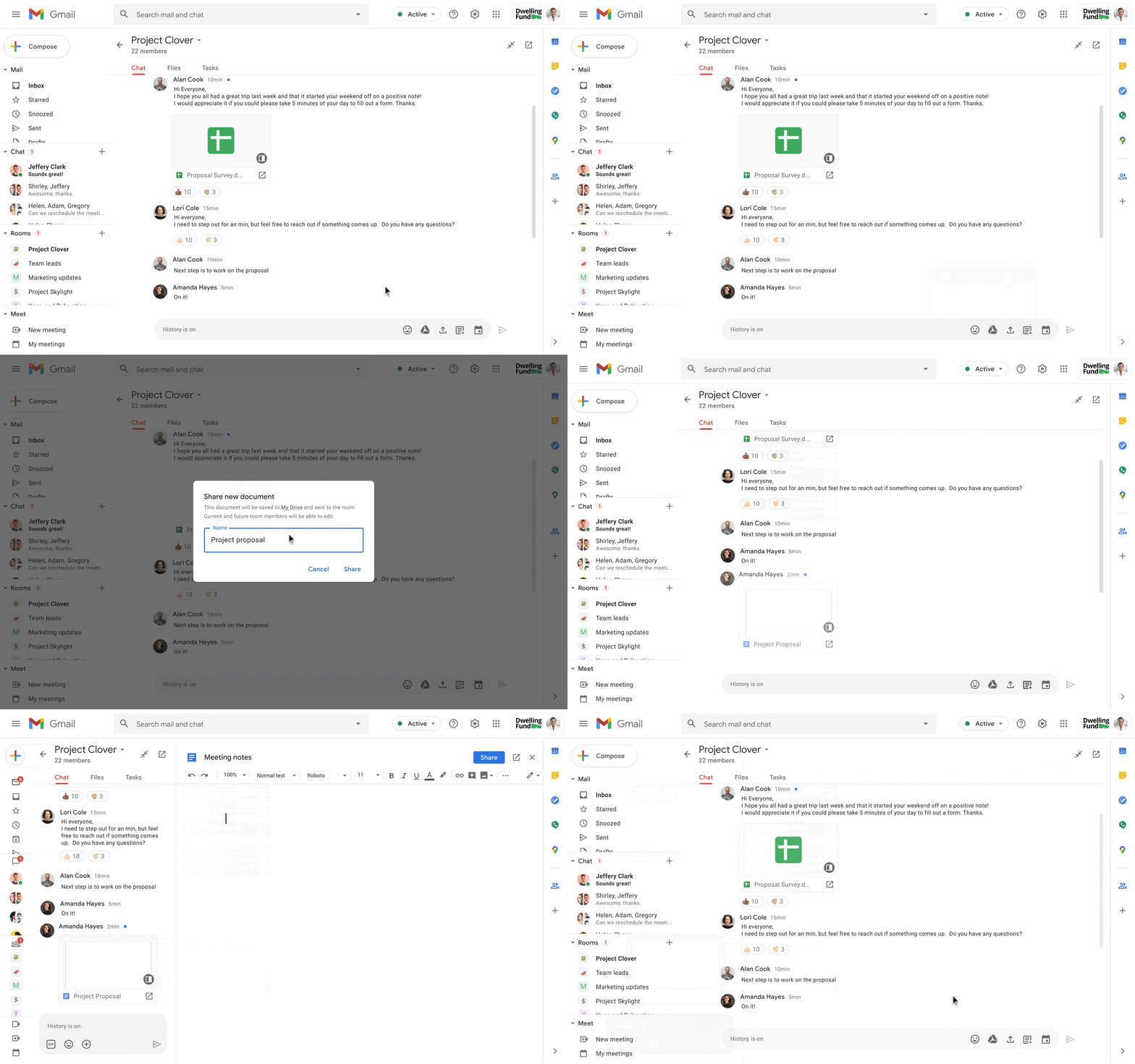
What’s maybe far more important than the brand, though, is that Google is also launching a few new features for G Suite Workspace today. For the most part, these are the Meet, Chat and Rooms integrations the company already announced earlier this summer. Google is now integrating all of these collaboration tools across its applications, with Gmail currently being the one service where they all come together.

Image Credits: Google

Among the new features that are coming soon are the ability to create and collaborate on documents with guests in Chat rooms and to preview linked files in Docs, Sheets and Slides without having to open them in a new tab. Whenever you @mention somebody in a document, Workspace will also pop up a smart chip, as Google calls it, to show you contact details and suggest actions (think starting a video call or chat — or to email them if you’re old school).

Gmail and Chat already feature a picture-in-picture mode that allows you to have Google Meet video calls in those services. This feature will roll out to Docs, Sheets and Slides in the coming months, too.

Pricing will mostly remain the same, though the naming is changing here a bit, too. The cheapest plan, Business Starter, starts at $6/month and users who need more storage and support for larger meetings can opt for the Business Standard plan for $12/user/month. What’s new is the $18/user/month Business Plus plan that includes additional security features and compliance tools like Vault and mobile device management capabilities.

Wednesday, September 30, 2020

Microsoft goes over the recent malware trends in its new "Digital Defense Report."


For many years, the Microsoft Security Intelligence Report has been the gold standard in terms of providing a yearly overview of all the major events and trends in the cyber-security and threat intelligence landscape.

While Microsoft unceremoniously retired the old SIR reports back in 2018, the OS maker appears to have realized its mistake, and has brought it back today, rebranded as the new Microsoft Digital Defense Report.

Just like the previous SIR reports, Microsoft has yet again delivered.

Taking advantage of its vantage points over vast swaths of the desktop, server, enterprise, and cloud ecosystems, Microsoft has summarized the biggest threats companies deal with today in the face of cybercrime and nation-state attackers.

The report is 88 pages long, includes data from July 2019 and June 2020, and some users might not have the time to go through it in its entirety. Below is a summary of the main talking points, Microsoft's main findings, and general threat landscape trends.

CYBERCRIME

2020 will, without a doubt, be remembered for the COVID-19 (coronavirus) pandemic. While some cybercrime groups used COVID-19 themes to lure and infect users, Microsoft says these operations were only a fraction of the general malware ecosystem, and the pandemic appears to have played a minimal role in this year's malware attacks.

Email phishing in the enterprise sector has also continued to grow and has become a dominant vector. Most phishing lures center around Microsoft and other SaaS providers, and the Top 5 most spoofed brands include Microsoft, UPS, Amazon, Apple, and Zoom.

Microsoft said it blocked over 13 billion malicious and suspicious mails in 2019, and out of these, more than 1 billion contained URLs that have been set up for the explicit purpose of launching a credential phishing attack.

Successful phishing operations are also often used as the first step in Business Email Compromise (BEC) scams. Microsoft said that crooks gain access to an executive's email inbox, watch email communications, and then spring in to trick the hacked users' business partners into paying invoices into wrong bank accounts.

msft-bec.png

Image: Microsoft

Per Microsoft, the most targeted accounts in BEC scams were the ones for C-suites and accounting and payroll employees.

But Microsoft also says that phishing isn't the only way into these accounts. Hackers are also starting to adopt password reuse and password spray attacks against legacy email protocols such as IMAP and SMTP. These attacks have been particularly popular in recent months as it allows attackers to also bypass multi-factor authentication (MFA) solutions, as logging in via IMAP and SMTP doesn't support this feature.

Furthermore, Microsoft says it's also seeing cybercrime groups that are increasingly abusing public cloud-based services to store artifacts used in their attacks, rather than using their own servers. Further, groups are also changing domains and servers much faster nowadays, primarily to avoid detection and remain under the radar.

RANSOMWARE GROUPS

But, by far, the most disruptive cybercrime threat of the past year have been ransomware gangs. Microsoft said that ransomware infections had been the most common reason behind the company's incident response (IR) engagements from October 2019 through July 2020.

And of all ransomware gangs, it's the groups known as "big game hunters" and "human-operated ransomware" that have given Microsoft the most headaches. These are groups that specifically target select networks belonging to large corporations or government organizations, knowing they stand to receive larger ransom payments.

Most of these groups operate either by using malware infrastructure provided by other cybercrime groups or by mass-scanning the internet for newly-disclosed vulnerabilities.

msft-ransomware.png

Image: Microsoft

In most cases, groups gain access to a system and maintain a foothold until they're ready to launch their attacks. However, Microsoft says that this year, these ransomware gangs have been particularly active and have reduced the time they need to launch attacks, and especially during the COVID-19 pandemic.

"Attackers have exploited the COVID-19 crisis to reduce their dwell time within a victim's system – compromising, exfiltrating data and, in some cases, ransoming quickly – apparently believing that there would be an increased willingness to pay as a result of the outbreak," Microsoft said today.

"In some instances, cybercriminals went from initial entry to ransoming the entire network in under 45 minutes."

SUPPLY-CHAIN SECURITY

Another major trend that Microsoft chose to highlight was the increased targeting of supply chains in recent months, rather than attacking a target directly.

This allows a threat actor to hack one target and then use the target's own infrastructure to attack all of its customers, either one by one, or all at the same time.

"Through its engagements in assisting customers who have been victims of cybersecurity intrusions, the Microsoft Detection and Response Team has observed an uptick in supply chain attacks between July 2019 and March 2020," Microsoft said.

But Microsoft noted that while "there was an increase, supply chain attacks represented a relatively small percentage of DART engagements overall."

Nonetheless, this doesn't diminish the importance of protecting the supply chain against possible compromises. Here, Microsoft highlights dangers coming from the networks of Managed Service Providers (MSPs, third-parties that provide a very specific service and are allowed to access a company's network), IoT devices (often installed and forgotten on a company's network), and open-source software libraries (which make up most of a company's software these days).

NATION-STATE GROUPS

As for nation-state hacking groups (also known as APTs, or advanced persistent threats), Microsoft said this year has been quite busy.

Microsoft said that between July 2019 and June 2020, it sent out more than 13,000 nation-state notification (NSN) to its customers via email.

According to Microsoft, most were sent for hacking operations linked back to Russian state-sponsored groups, while most of the victims were located in the US.

msft-apt-nsn.png

Image: Microsoft

These email notifications were sent for email phishing attacks against its customers. Microsoft said it tried to counter some of these attacks by using court orders to seize domains used in these attacks.

Over the past year, Microsoft seized domains previously operated by nation-state groups like Strontium (Russia), Barium (China), Phosphorus (Iran), and Thallium (North Korea).

Another interesting finding of the Microsoft Digital Defense Report is that the primary targets of APT attacks have been non-governmental organizations and the services industry.

This particular finding goes against the grain. Most industry experts often warn that APT groups prefer to target critical infrastructure, but Microsoft says its findings tell a different story.

"Nation state activity is more likely to target organizations outside of the critical infrastructure sectors by a significant measure, with over 90% of notifications served outside of these sectors," Microsoft said.

As for the techniques that have been preferred this past year (July 2019 to June 2020) by nation-state groups, Microsoft noted several interesting developments, with the rise of:

  • Password spraying (Phosphorus, Holmium, and Strontium)
  • Use of penetration testing tools (Holmium)
  • The use of ever-more-complex spear-phishing (Thallium)
  • The use of web shells to backdoor servers (Zinc, Krypton, Gallium)
  • The use of exploits targeting VPN servers (Manganese)
msft-apt.jpg

Image: Microsoft

All in all, Microsoft concludes that criminal groups have evolved their techniques over the past year to increase the success rates of their campaigns, as defenses have gotten better at blocking their past attacks.

Just like in years prior, the entire cybersecurity landscape appears to be sitting on a giant merry-go-round, and constant learning and monitoring is required from defenders to keep up with the ever-evolving attackers, may them be financially-motivated or nation-sponsored groups.


Windows 10 is pushing old drivers updates that you should avoid


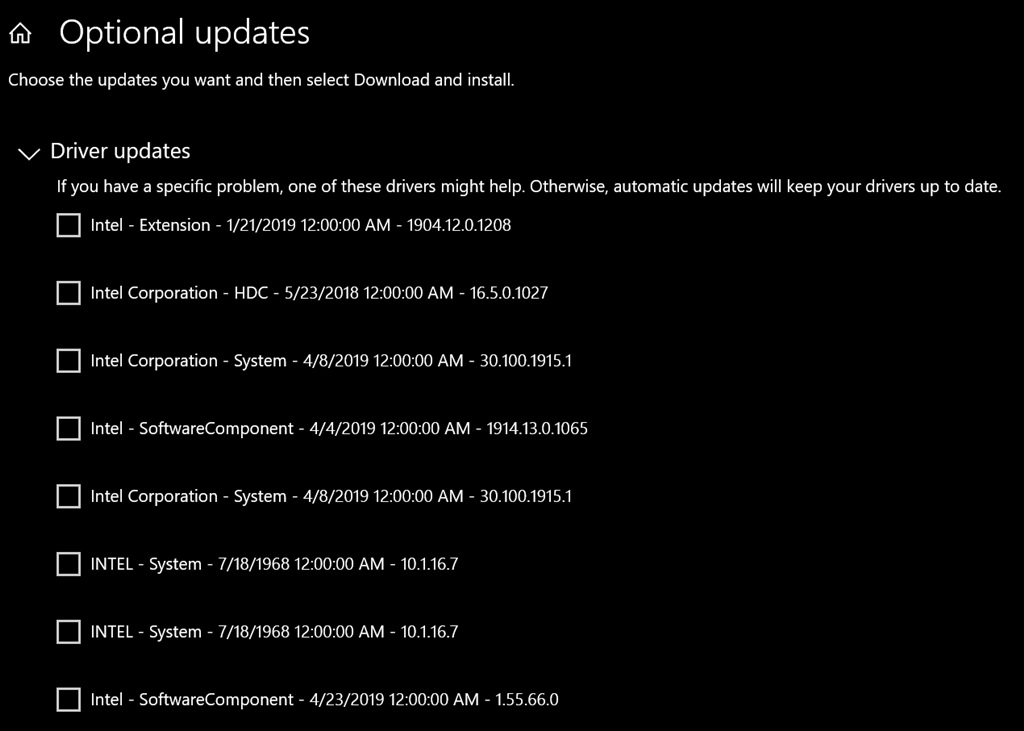
Windows update is offering this optional update: INTEL - System - 7/18/1968 12:00:00 AM - 10.1.15.6 Intel System driver update released in September 2020.

Microsoft has created another mess of Windows Updates on Windows 10, although this time the update wasn’t botched. According to user reports, Microsoft has started rolling out old and inappropriate drivers to some machines, including one of our devices from Asus.

Users are reporting that inappropriate driver updates are getting pushed to Windows 10 devices which aren’t registered for the Insider program.

The update in the question is “Intel – System”, which was pushed out last week alongside other optional driver updates for Windows 10 version 2004 (May 2020 Update).

We’ve also observed users report another bug where the same driver update will reappear for download after successful installation.

“I installed the ‘Hewlett-Packard Development Company, L.P. – Keyboard – Standard 101/102-Key or Microsoft Natural PS/2 Keyboard for HP Hotkey Support” Optional Update that was available. Update History and Reliability Monitor confirm a successful update but it still shows up on the optional updates list,” one user noted in the Feedback Hub.

Windows 10 driver update problem

In some cases, Windows Update could also show old drivers, including drivers with a release date of 1968. Microsoft appears to be backdating drivers intentionally to avoid installation of Windows-provided driver when you have a custom manufacturer-provided driver.

If you do happen to see the ‘Intel – System’ or other inappropriate drivers displayed under “Optional Updates” section in the Windows Update page, don’t install it.

In case the update has already been pulled by Microsoft, you shouldn’t see it any longer anyway.

Unfortunately, if you’ve applied the driver updates, there’s a piece of bad news – your device driver has been downgraded and you’ll need to download the latest and most compatible version from the manufacturer’s website.

Going by reports across the forums, those folks who have uninstalled the driver or skipped the update, haven’t encountered any issues in doing so. Also, the update isn’t being forced, so users haven’t encountered any widespread problems.

That said, be careful when you use the Optional Updates screen in Windows Update and you’re obviously doing updates it at your own risk

Tuesday, September 29, 2020

Dark theme now available for Docs, Sheets, and Slides on iOS


Quick launch summary 

You can now use Dark theme with Google Docs, Sheets, and Slides on iOS devices. Dark theme is already available for Android users

Dark theme in Google Docs, Slides, and Sheets on iOS. 

You can also preview how your document will look in light theme for collaborators and viewers by selecting the three-dot “More” menu and toggling the “view in light theme” option.  

Getting started 

Rollout pace 

Availability 

  • Available to all G Suite customers and users with personal Google Accounts 

Google Meet attendance reports available now for education meetings


What’s changing 

Organizers of G Suite Enterprise for Education meetings will now receive an attendance report via email once the meeting is over. Attendance reports will be generated for web or mobile meetings with at least five (and no more than 250) participants and will contain the following information for each:
  • Participant’s name 
  • Participant’s email 
  • Length of time a participant was on the call, including when they joined and exited 
Once a meeting is finished, you’ll receive an attendance report via email.

The attendance report contains the names, email addresses, and duration of time participants were in the meeting.


Students who have the ability to create meetings will receive attendance reports as well. 

Who’s impacted 

End users 

Why you’d use it 

We hope attendance reports will help meeting organizers keep track of who attended their meetings and for how long, which can be challenging during larger meetings or while presenting. 

Additional details 

Recording attendance for ejected or dial-in participants 
We’ll record the attendance of any participants who chose to dial in. The obfuscated phone number and name displayed during the meeting will appear in the attendance report. 

If a meeting participant is ejected and re-admitted to the meeting, you’ll see the time they first joined and the time they last left. The total duration of their attendance will be a sum of their sessions. 

Getting started 

  • Admins: At this time, there is no admin control for this feature. We’re planning to introduce this setting later this year; stay tuned to the G Suite Updates blog to learn when it launches. 
  • End users: There is no end user setting for this feature. Attendance reports will automatically be sent to the meeting host. Visit the Help Center to learn more about attendance tracking

Rollout pace 

Availability 

  • Available to G Suite Enterprise for Education customers only at this time. 
  • Not available to G Suite Essentials, G Suite Basic, G Suite Business, G Suite for Education, G Suite Enterprise, and G Suite for Nonprofits customers. Stay tuned to the G Suite Updates blog for information when this launches to additional customers. 

Google’s Keep note-taking app is getting a new feature courtesy of Android 14 that’s a huge time-saver, even if Samsung got there first

  There’s a certain balance that needs to be achieved with lock screen functionality. You can’t give away too much because of, well, securit...