Thursday, June 15, 2017

Backup and Sync from Google available soon

On June 28th, 2017, we will launch Backup and Sync from Google, a tool intended to help everyday users back up files and photos from their computers, so they’re safe and accessible from anywhere. Backup and Sync is the latest version of Google Drive for Mac/PC, which is now integrated with the Google Photos desktop uploader. As such, it will respect any current Drive for Mac/PC settings in the Admin console.


Backup and Sync is primarily intended for consumer users. We recommend that our G Suite customers continue to use Drive for Mac/PC until our new enterprise-focused solution, Drive File Stream (currently in EAP), is made generally available to all G Suite Basic, Business, Enterprise, Education, and Nonprofit domains later this year. Drive File Stream will allow users to access huge corporate data sets without taking up the equivalent space on their hard drives.

With that in mind, we will not automatically upgrade G Suite users from Drive for Mac/PC to Backup and Sync at this time. If you currently allow your users to install Drive for Mac/PC on their own computers, they will be able to download and upgrade to Backup and Sync starting on Wednesday, June 28th. If you don’t currently allow Google Drive for Mac/PC in your organization, your users won’t be able to use Backup and Sync with their G Suite accounts.

For more details, check out the resources below starting on June 28th. If you’re interested in trying Drive File Stream, sign up for the Early Adopter Program (EAP) today.

Launch Details
Release track:
Available for download starting on June 28th, 2017

Tuesday, June 6, 2017

Visualize data instantly with machine learning in Google Sheets

Sorting through rows and rows of data in a spreadsheet can be overwhelming. That’s why today, we’re rolling out new features in Sheets that make it even easier for you to visualize and share your data, and find insights your teams can act on.

Ask and you shall receive → Sheets can build charts for you

Explore in Sheets, powered by machine intelligence, helps teams gain insights from data, instantly. Simply ask questions—in words, not formulas—to quickly analyze your data. For example, you can ask “what is the distribution of products sold?” or “what are average sales on Sundays?” and Explore will help you find the answers.

Now, we’re using the same powerful technology in Explore to make visualizing data even more effortless. If you don’t see the chart you need, just ask. Instead of manually building charts, ask Explore to do it by typing in “histogram of 2017 customer ratings” or “bar chart for ice cream sales.” Less time spent building charts means more time acting on new insights.


Instantly sync your data from Sheets → Docs or Slides

Whether you’re preparing a client presentation or sharing sales forecasts, keeping data up-to-date can be time-consuming, especially if you need to update charts or tables in multiple sources. This is why we made it easier to programmatically update charts in Docs and Slides last year.

Now, we’re making it simple to keep tables updated, too. Just copy and paste data from Sheets to Docs or Slides and tap the “update” button to sync your data.


Even more Sheets updates

We’re constantly looking for ways to improve our customers’ experience in Sheets. Based on your feedback, we’re rolling out more updates today to help teams get work done faster:

  • Keyboard shortcuts: Change default shortcuts in your browser to the same spreadsheet shortcuts you’re already used to. For example, delete a row quickly by using “Ctrl+-.”
  • Upgraded printing experience: Preview Sheet data in today’s new print interface. Adjust margins, select scale and alignment options or repeat frozen rows and columns before you print your work.
  • Powerful new chart editing experience: Create and edit charts in a new, improved sidebar. Choose from custom colors in charts or add additional trendlines to model data. You can also create more chart types, like 3D charts. This is now also available for iPhones and iPads.
  • More spreadsheet functions: We added new functions to help you find insights, bringing the total function count in Sheets to more than 400. Try “SORTN,” a function unique to Sheets, which can show you the top three orders or best-performing months in a sales record spreadsheet. Sheets also supports statistical functions like “GAMMADIST,” “F.TEST” and “CHISQ.INV.RT.”
  • Increased support for charts in the Sheets API: Use the API to programmatically generate most charts with support for dozens of new operations.

These new features in Sheets are rolling out starting today. Learn how Sheets can help you find valuable insights.

One last thing—so that we can focus our efforts on the improvements to charts outlined above, we’re also deprecating one of the lesser-used chart types: the Motion chart. Beginning in July 2017, you will no longer be able to insert or create Motion charts, and, in September 2017, you will no longer be able to edit them.

No earlier than December 2017, any Motion charts still in Sheets will become static images and no longer update when their corresponding data changes. 

We recommend trying Bubble charts instead.

  • All mobile and API features launching to both Rapid release and Scheduled release on June 1st, 2017
  • All web features launching to Rapid release on June 1st, 2017, with Scheduled release coming on June 14th, 2017
  • Friday, May 19, 2017

    Google Lens will let smartphone cameras understand what they see and take action

    At Google’s I/O developer conference, CEO Sundar Pichai announced a new technology called Google Lens. The idea with the product is to leverage Google’s computer vision and AI technology in order to bring smarts directly to your phone’s camera. As the company explains, the smartphone camera won’t just see what you see, but will also understand what you see to help you take action.
    During a demo, Google showed off how you could point your camera at something and Lens tells you what it is — like, it could identify the flower you’re preparing to shoot.

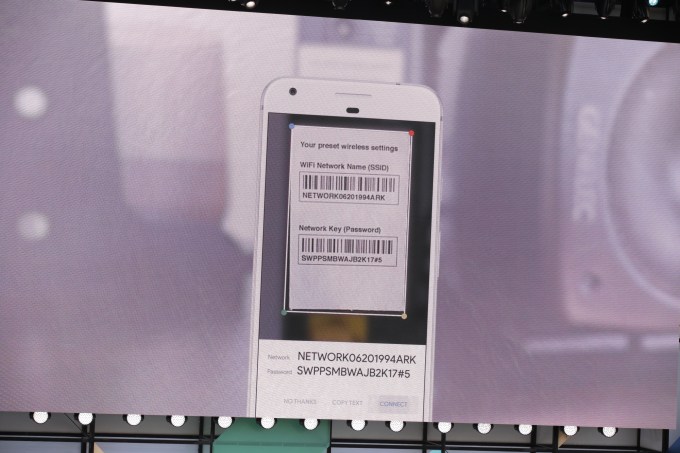
    In another example, Pichai showed how Lens could do a common task — connecting you to a home’s Wi-Fi network by snapping a photo of the sticker on the router.
    In that case, Google Lens could identify that it’s looking at a network’s name and password, then offer you the option to tap a button and connect automatically.

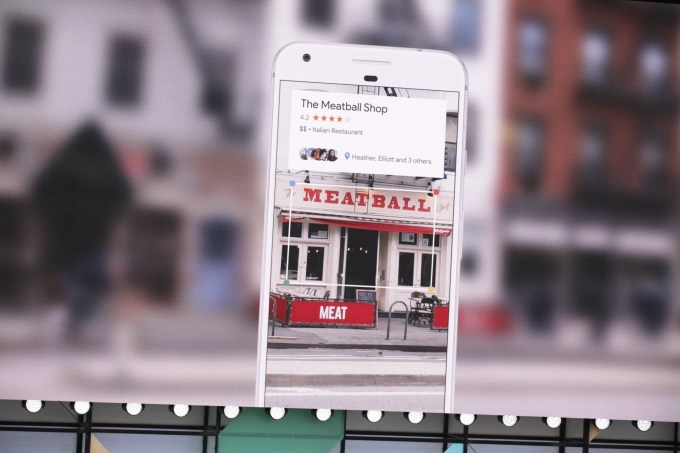
    A third example was a photo of a business’s storefront — and Google Lens could pull up the name, rating and other business listing information in a card that appeared over the photo.

    The technology basically turns the camera from a passive tool that’s capturing the world around you to one that’s allowing you to interact with what’s in your camera’s viewfinder.
    Later, during a Google Home demonstration, the company showed how Lens would be integrated into Google Assistant. Through a new button in the Assistant app, users will be able to launch Lens and insert a photo into the conversation with the Assistant, where it can process the data the photo contains.
    To show how this could work, Google’s Scott Huffman holds his camera up to a concert marquee for a Stone Foxes show and Google Assistant pulls up info on ticket sales. “Add this to my calendar,” he says — and it does.

    The integration of Lens into Assistant can also help with translations.
    Huffman demonstrates this by holding up his camera to a sign in Japanese, tapping the Lens icon and saying “What does this say?” Google Assistant then translates the text.
    In addition, Pichai showed how Google’s algorithms could more generally clean up and enhance photos — like when you’re taking a picture of your child’s baseball game through a chain-link fence, Google could remove the fence from the photo automatically. Or if you took a photo in a low-light condition, Google could automatically enhance the photo to make it less pixelated and blurry.
    The company didn’t announce when Google Lens would be available, only saying that it’s arriving “soon.”


    Thursday, May 18, 2017

    Todoist launches a deep integration with Google Calendar


    Todoist is quite a powerful task manager, but it didn’t communicate with your calendar until now. If you’re a Google Calendar user and want to check your tasks and events for tomorrow, you currently have to check both Google Calendar and Todoist. This is about to change as Todoist is launching a deep two-way integration between Todoist and Google Calendar.
    After hooking up your Todoist account with Google Calendar, your tasks are going to show up in your calendar if they have a due date. If you also entered a specific time of the day, you’ll see an event in your calendar. Recurring tasks will create multiple events.
    After that, you can click on your calendar events, edit them, move them around and everything will be synchronized back to Todoist. This way, you get a calendar view of your tasks… in your calendar. It’s also a good way to let other people add stuff to your calendar thanks to shared projects.
    If you have a ton of tasks and don’t want to clutter your calendar, you can choose to enable the integration for a project in particular. And that’s about it.
    I’m not a fan of mixing your calendar events with your tasks, but I know that many people like to handle both in the same interface. As long as you’re a Google Calendar user, Todoist is now making that easier.

    Save time with Smart Reply in Gmail

    It’s pretty easy to read your emails while you’re on the go, but responding to those emails takes effort. Smart Reply, available in Inbox by Gmail and Allo, saves you time by suggesting quick responses to your messages. The feature already drives 12 percent of replies in Inbox on mobile. And starting today, Smart Reply is coming to Gmail for Android and iOS too.

    Smart Reply suggests three responses based on the email you received:
    Once you’ve selected one, you can send it immediately or edit your response starting with the Smart Reply text. Either way, you’re saving time. 

    Smart Reply utilizes machine learning to give you better responses the more you use it. So if you're more of a “thanks!” than a “thanks.” person, we'll suggest the response that's, well, more you! If you want to learn about the smarts behind Smart Reply, check out the Google Research Blog.

    Smart Reply will roll out globally on Android and iOS in English first, and Spanish will follow in the coming weeks. Stay tuned for more languages coming soon!

    Tuesday, May 16, 2017

    Customer Guidance for WannaCrypt attacks

    Microsoft solution available to protect additional products
    Today many of our customers around the world and the critical systems they depend on were victims of malicious “WannaCrypt” software. Seeing businesses and individuals affected by cyberattacks, such as the ones reported today, was painful. Microsoft worked throughout the day to ensure we understood the attack and were taking all possible actions to protect our customers. This blog spells out the steps every individual and business should take to stay protected. Additionally, we are taking the highly unusual step of providing a security update for all customers to protect Windows platforms that are in custom support only, including Windows XP, Windows 8, and Windows Server 2003. Customers running Windows 10 were not targeted by the attack today.
    Details are below.
    • In March, we released a security update which addresses the vulnerability that these attacks are exploiting. Those who have Windows Update enabled are protected against attacks on this vulnerability. For those organizations who have not yet applied the security update, we suggest you immediately deploy Microsoft Security Bulletin MS17-010.
    • For customers using Windows Defender, we released an update earlier today which detects this threat as Ransom:Win32/WannaCrypt. As an additional “defense-in-depth” measure, keep up-to-date anti-malware software installed on your machines. Customers running anti-malware software from any number of security companies can confirm with their provider, that they are protected.
    • This attack type may evolve over time, so any additional defense-in-depth strategies will provide additional protections. (For example, to further protect against SMBv1 attacks, customers should consider blocking legacy protocols on their networks).
    We also know that some of our customers are running versions of Windows that no longer receive mainstream support. That means those customers will not have received the above mentioned Security Update released in March. Given the potential impact to customers and their businesses, we made the decision to make the Security Update for platforms in custom support only, Windows XP, Windows 8, and Windows Server 2003, broadly available for download (see links below).
    Customers who are running supported versions of the operating system (Windows Vista, Windows Server 2008, Windows 7, Windows Server 2008 R2, Windows 8.1, Windows Server 2012, Windows 10, Windows Server 2012 R2, Windows Server 2016) will have received the security update MS17-010 in March. If customers have automatic updates enabled or have installed the update, they are protected. For other customers, we encourage them to install the update as soon as possible.
    This decision was made based on an assessment of this situation, with the principle of protecting our customer ecosystem overall, firmly in mind.
    Some of the observed attacks use common phishing tactics including malicious attachments. Customers should use vigilance when opening documents from untrusted or unknown sources. For Office 365 customers we are continually monitoring and updating to protect against these kinds of threats including Ransom:Win32/WannaCrypt. More information on the malware itself is available from the Microsoft Malware Protection Center on the Windows Security blog. For those new to the Microsoft Malware Protection Center, this is a technical discussion focused on providing the IT Security Professional with information to help further protect systems.
    We are working with customers to provide additional assistance as this situation evolves, and will update this blog with details as appropriate.
    Phillip Misner, Principal Security Group Manager  Microsoft Security Response Center
    Further resources: 

    Saturday, May 13, 2017

    Adding nine third-party applications to the G Suite pre-integrated SSO apps catalog

    Single-Sign-On (SSO) is one of those rare features that enhances security while also increasing convenience for end users. Google supports the two most popular Enterprise SSO standards, OpenID Connect and SAML. There are over 800 applications with pre-integrated SSO support in our third party apps catalog already, and we are constantly adding more. With today’s launch, we are adding SAML integration for these nine applications: Asana, Dialpad, Evernote Business, Expensify, Keeper, Lucidchart, Pagerduty, RingCentral, and Trello.

    You can find our full list of pre-integrated applications, as well as instructions for installing them, in the Help Center.

    Note that apart from the pre-integrated SAML applications, G Suite also supports installing “Custom SAML Applications” which means that admins can install any third-party application that supports SAML. The advantage of a pre-integrated app is the installation is much easier. You can learn more about installing Custom SAML Applications in this Help Center article.

    Differences between G Suite Marketplace and the SAML Apps Catalog

    You may notice that some of the applications we are launching today to the SAML catalog - namely Asana, Dialpad, Expensify, Lucidchart, RingCentral, and Trello - are already available in the G Suite Marketplace. When installed via the Marketplace, these applications provide rich integration with G Suite products. In addition to these deep integrations, the applications typically provide a separate ‘Google SSO’ option, which is authentication via OpenID Connect protocol, for users to access their accounts on the application’s website.

    The SAML catalog version, on the other hand, only provides SAML-based authentication so that your users can access their accounts in the third party app’s website using Google as a SAML IdP (Identity Provider). Some enterprises prefer the SAML approach, and in fact, we see many admins installing these as Custom SAML Apps even today. This launch is all about giving our customers more choice to integrate their applications using a method that suits them.

    If you do not have a corporate requirement to use SAML, Google recommends using the G Suite Marketplace application.

    Wednesday, May 3, 2017

    You’ll be able to upgrade any Windows 10 S device to Windows 10 Pro


    Microsoft just unveiled a new operating system — Windows 10 S. This secured and streamlined operating system is perfect for the education market. But Microsoft is also going to ship Windows 10 S on its perfectly capable Surface Laptop.
    During the press conference, the company has compared the new $999 laptop with various MacBooks, making it even more puzzling that it opted for a limited operating system. What’s the point of buying a Core i7 laptop if it can’t run Photoshop?
    Windows 10 S only runs sandboxed apps that are available in the Windows Store. In other words, you won’t be able to go to awesomesoftware.com and download apps. You can’t even download Google Chrome on this thing.
    I’m sure Microsoft hopes that major software makers like Google and Adobe are all going to release their apps on the Windows Store. But the Windows Store won’t be enough for most people.
    Microsoft has a solution for you. If you buy a cheap $189 Windows 10 S laptop, you’ll be able to upgrade it to a full-fledged Windows 10 Pro operating system for a one-time fee of $49.
    If you’re buying those Chromebook competitors as a student, a teacher or a school administrator, you’ll be able to upgrade those devices to Windows 10 Pro for free. You’ll also be able to restrict the upgrade so that your devices stay secure.
    By limiting Windows 10 S to Windows Store apps, you won’t get any malware or virus. Many school districts will like that those laptops require minimum maintenance.
    Finally, if you’re a non-education customer buying a Surface Laptop, you’ll be able to upgrade to Windows 10 Pro for $49. But the tech specs page says that the upgrade will be free until the end of the year.
    It’s unclear why you can only upgrade to Windows 10 Pro and not just Windows 10 Home — the Home version is not going away, adding another layer of confusion. But Microsoft doesn’t want to restrict you. So if you know what you’re doing and want to be able to do whatever you want with your laptop, you’ll be able to do it for $0 to $49 depending on your situation.

    UberEats launches in India, starting out in Mumbai


    Uber has launched its UberEats service in India yesterday, where it will initially be available in Mumbai.
    The company said it plans to expand the reach of UberEats in India to six cities before the end of the year, but it did not disclose which cities it will hit. Mumbai is as good a place to start as any, being that it is one of India’s three business hubs and a city with an estimated population of 20 million people.
    “Mumbai is home to a booming food industry with a vibrant food culture offering both global and local cuisines. The introduction of UberEats in India, with Mumbai as the first city, is a major step in our global expansion and showcases our commitment to the region,” Bhavik Rathod, Head of UberEats India, said in a statement.
    This new UberEats launch, which was first teased in January, takes the service in 78 cities across 26 countries worldwide. Eats first began as a pilot project in 2014 in Los Angeles, initially inside the core Uber app but it later got a standalone app. It entered Asia through a launch in Singapore back in March of last year, and across the region it is also available in Tokyo, Japan, and Bangkok, Thailand.
    India is, of course, a huge global opportunity, and it is one that Uber is more committed to than ever having exited the Chinese market. India’s online population is tipped to reach 450 million-465 million people by June 2017, according to a report co-authored by the Internet and Mobile Association of India, bringing with it the potential to connect people, be it to taxis, cars, food and more. E-commerce sales alone, for example, are estimated to reach $48 billion by 2020, analyst firm Forrester claimed.
    UberEats is up against plenty of competition in Mumbai, where the likes of FoodPanda, Swiggy and Zomato have competed for a number of years. Last month, Google even ventured into the space with its own service for ordering food or home services. Ola, Uber’s on-demand ride rival in India, also dabbled in food, but its program was closed down last year after less than 12 months of operations.
    Uber isn’t saying too much about how it plans to tackle its rivals. In other cities, it has put a heavy focus on curating its list of restaurants — others, like FoodPanda, operate as a more volume-focused marketplace — and it is of course sure to lean on its ride-sharing business, which is battling hard with Ola.
    While there are no clear metrics that show which company is ahead of the other, Ola has been consistently linked with a new round of funding that would reduce its valuation. The firm reportedly raised $250 million in fresh capital at a $3 billion valuation, according to the Economic Times reported, which would be down from a $5 billion valuation in 2015. That down round may be a reflection of the challenge of growing a tech business beyond tier-one and -two cities in India and into rural areas, but another aspect could be the consistent challenge that Uber is bringing.
    Uber has thrown more focus on Eats lately, beyond its ongoing global expansion. Recent updates added tailored recommendations, customizable drop-off directions for drivers and new filtering options, while it also introduced a restaurant management service that helps restaurant partners get actionable insight through data.

    YouTube revamps its desktop site with an updated design, optional dark theme, and faster framework


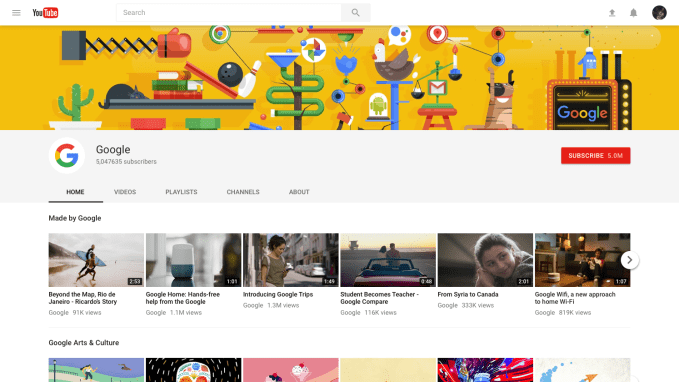
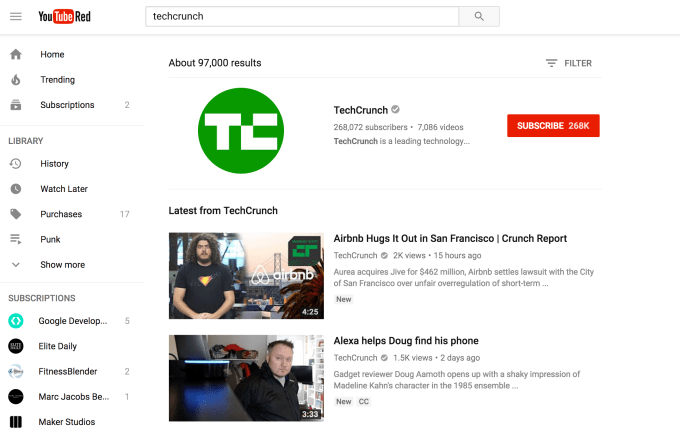
    YouTube turned 12 on Monday. To celebrate the milestone, the company is today launching a redesign of its desktop site, which now takes advantage of Google’s design language, Material Design, to make the site cleaner, simpler and more consistent with the YouTube app across devices. The site will also include a handful of new features, including a new dark mode, tweaks to search and channel pages, and an updated theater mode for watching videos in a larger player without going full-screen.
    However, what’s under the hood is perhaps YouTube’s biggest change yet.
    The site has been rebuilt on top of Polymer, the open source JavaScript library introduced at the Google I/O developer event several years ago. The benefit to using Polymer is that it allows developers to create web components that can be re-used.
    The project to build YouTube on Polymer started a year ago, and is the most significant aspect to YouTube’s redesign, even though it’s less visible to end users.
    “Things that get built once can then be reapplied more quickly,” explains Manuel Bronstein, VP of Product Management at YouTube, of Polymer. “It’s less about a particular feature, and it’s more about the velocity of which things can be brought to market. This then enables us to explore and then do more things,” he says.
    YouTube’s new Dark Theme, for example, is something that was easier to develop thanks to Polymer.
    The theming option was spotted in the wild last month, but required users to change a few settings in their Chrome browser in order to view it.
    Today, Dark Theme will be a simple switch users can toggle on or off from the site itself. The idea is that by changing YouTube’s white background to black, it offers a better viewing experience when you’re watching videos at night or with the lights off. With less glare, it’s easier on your eyes and you can better see the videos’ true colors.
    The company hasn’t yet confirmed if it will port Dark Theme to other devices, saying instead it will track the usage of Dark Theme first to see if the feature is widely adopted. (It seems reasonable to think that it would make its way to mobile, though – after all, if Twitter can have dark mode, surely YouTube warrants one.)
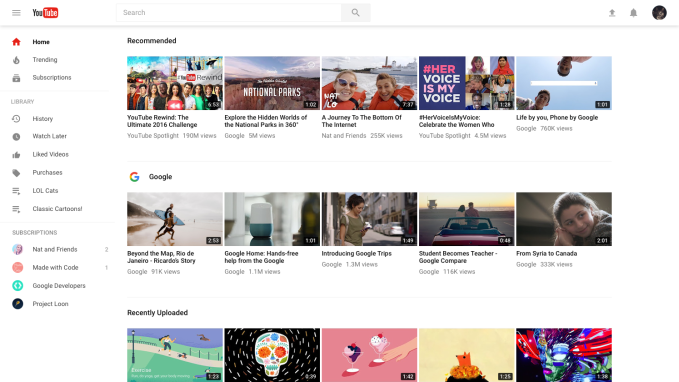
    Above: Old Website
    Above: New Website
    The most noticeable change you’ll see when you first view the redesigned YouTube site, however, is the Material Design-infused makeover. The left-side navigational elements can now be tucked away out of view with a click on the hamburger menu at the top left of the screen and now align with what you would see on mobile.
    There are three main sections at the top: Home, Trending, and Subscriptions, followed by Your Library (your saves, purchases, playlists and more), and a list of your individual subscriptions.
    As you scroll down the YouTube homepage, you never reach the end. The page is now an endless list of recommendations both from channels you subscribe to as well as others YouTube thinks you’ll like.
    You’ll also notice that when you hop over to a channel’s page, things look a little different, too.
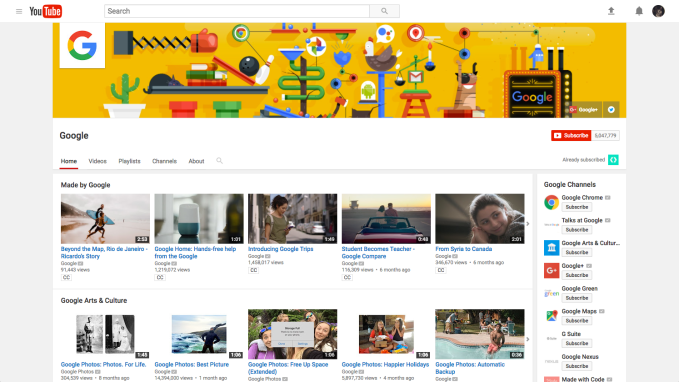
    Above: Old Channel Page
    Above: New Channel Page
    The channel now features a full-width page banner at the top of the screen, and its hero media (the video that plays to introduce the channel or show off its latest content) is larger, as well.
    The navigational elements with the channel (Home, Video, Playlists, Channels, Discussion, About, etc.) are larger and simpler to navigate through. Channels are tucked away under their tab, instead of the sidebar. And with the cleaner design, the redesigned red “Subscribe” button – which grew in size, too – really pops against background.
    When you’re watching a video on the channel, the “Theater Mode” option has been tweaked to be slightly wider than before and now features a black background.
    That big, red “Subscribe” button is also more prominent in Search results on the site, and shows up at the top when a channel matches your search query. It’s also now easier to see the difference between channels and content in the search results page, as a result.
    What you might not immediately notice, as you poke around the site’s new features, is that the experience of using YouTube on the desktop might seem a little faster now. Of course, how much faster depends on several factors, like your internet speed and your device, for example. But if you happen to notice a speed bump, you’re likely not imagining things.
    With the switch to Polymer, the YouTube team can now spend more time working to improve latency.
    “Latency is the kind of thing you can always invest in making better,” says Bronstein. “We’re always thinking about how we can make the consumption of media more immediate, because the faster we get you to what you want to watch, the better,” he says.
    Users today will have to opt-in to try out YouTube’s new look by visiting youtube.com/new. If you want to return to the old YouTube, you can select “Restore classic YouTube” from your Account Menu.
    The company cautions the new YouTube is still a work in progress, and there will be a cap of some sort on how many people will be able to opt into the new experience.

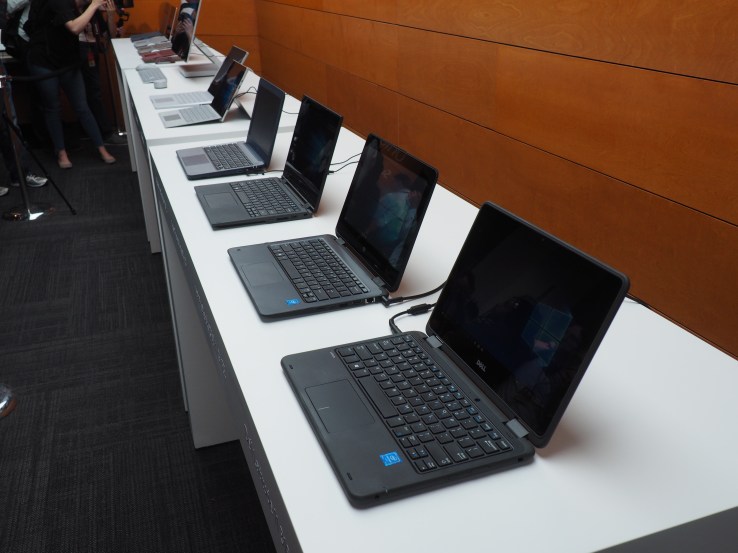
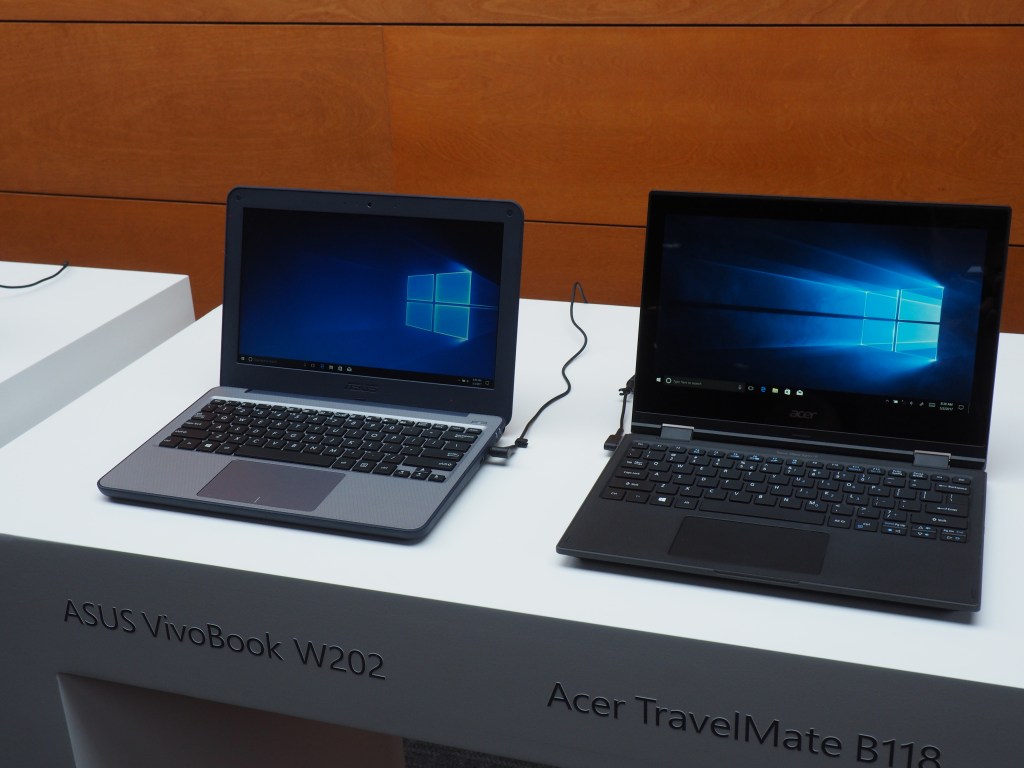
    Microsoft’s new education push plays to its strengths, the cheap and familiar


    Microsoft never mentioned Chromebook by name, but it’s clear that Google’s browser-based hardware offering was at the front of everyone’s mind at today’s education event in New York City. The company has managed to control much of the market internally, but the Chromebook has swiftly eroded marketshare here in the States.
    Microsoft’s solution is playing into the company’s strengths of low cost hardware running familiar software. That’s precisely what Windows 10 S is all about. Unlike recent education plays from the company that centered around the Surface, Microsoft has returned to its roots, focusing on what made it a hit during the rise of netbooks: the low barrier of entry.
    The company’s focus on Surface in education was a rejection of that appeal. Microsoft clearly learned from the rise of the iPad in education that the best solution was a premium one, hoping the highest end experience would be a lasting one that students would take with them as they graduated and entered the real world.
    That focus allowed Google to sneak in. Much maligned at launch, Chromebooks have ultimately proven a hit in education due in no small part to their extremely low barrier of entry, coupled with software features focused at the IT departments that make many of the purchasing decisions for schools and districts.
    When the company announced Intune for Education paired with hardware systems starting at $189 back in January, it was clear that the company had learned from its missteps. The percentage of schools that can afford a truly premium one-to-one hardware solution is limited to small private schools and the like. And those school often opt for the iPad for its premium hardware/software solution.
    For everyone else, cost is paramount. Windows 10 S is an acknowledgement of this fact. Due out this summer on a slew of systems from hardware partners like Dell and HP, the streamlined OS plays into this, and by delivering a familiar software experience, it may well maintain some of the market abroad, as it delivers familiar productivity solutions like Office, coupled with new additions like mixed reality and 3D content creation.
    And, of course, the company will be able to maintain a fuller offline experience than many Chromebooks, which are still largely browser based. With more complete offline functionality, these devices can help the company stay ahead in other parts of the world where school WiFi is a luxury, rather than a given.
    Sure, Surface will continue to be part of the company’s solution in education. The company even used today’s event to announce a new device in that space. But if that system has success in education, it will be of the higher variety – high school, perhaps, but even more likely college.
    If the company is really going to retain and regain classroom desk space, it’s going to do so with the simple, the familiar and the affordable.

    Google’s Keep note-taking app is getting a new feature courtesy of Android 14 that’s a huge time-saver, even if Samsung got there first

      There’s a certain balance that needs to be achieved with lock screen functionality. You can’t give away too much because of, well, securit...